1. Kirish
Sotib olganingiz uchun tashakkurasing the Moukey MAMP3 ta 2.0 kanalli stereo Amplifier. This manual provides essential information for the safe and efficient operation of your device. Please read it thoroughly before use and retain it for future reference.
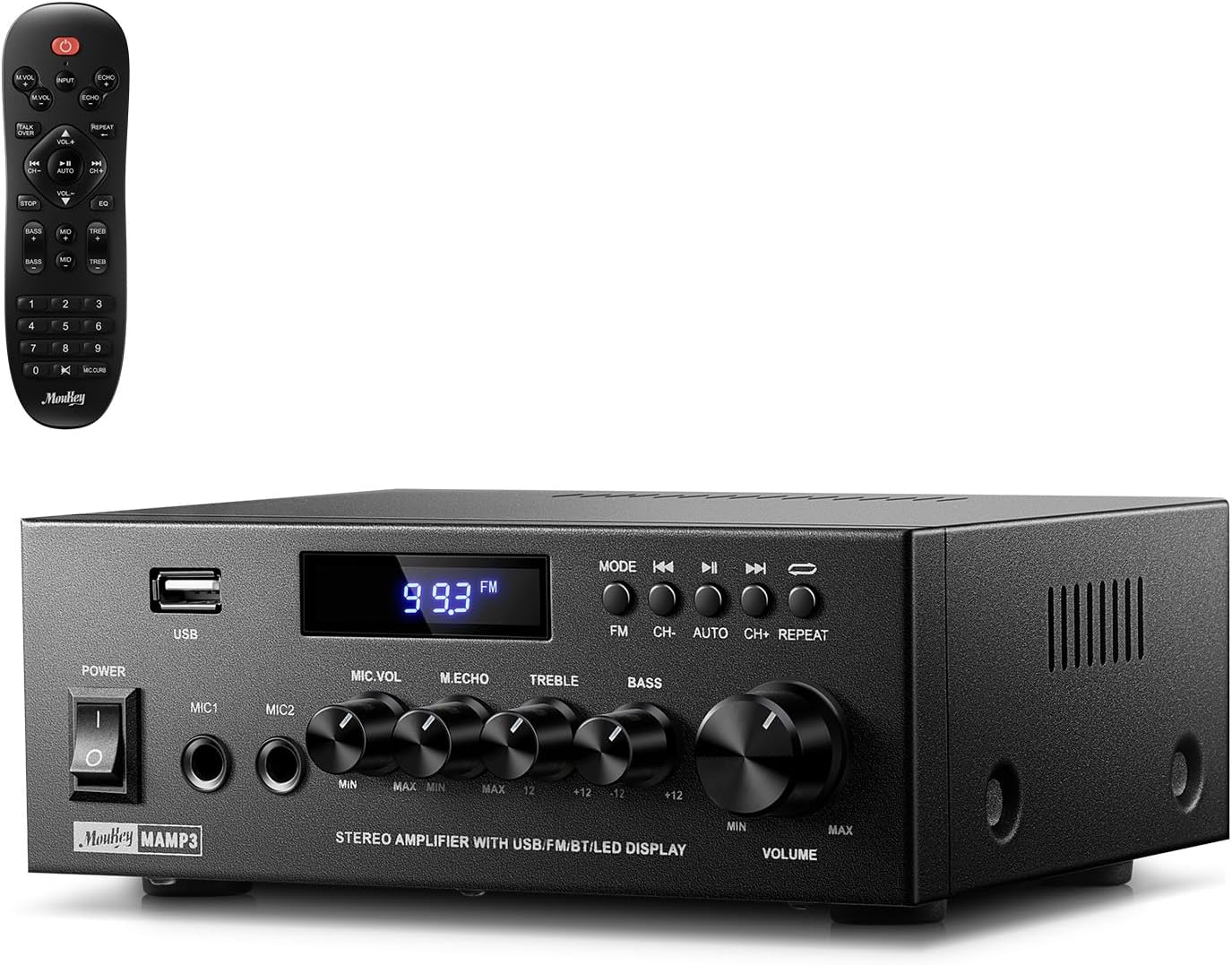
Image 1.1: The Moukey MAMP3 ampko'targich va uning masofadan boshqarish pulti.
2. Xavfsizlik bo'yicha ko'rsatmalar
- Ishlatishdan oldin barcha ko'rsatmalarni o'qing amphayotiyroq.
- ni saqlang amplifier away from water, moisture, and extreme temperatures.
- Do not block ventilation openings. Ensure proper airflow around the unit.
- Faqat jihoz bilan birga kelgan quvvat adapteridan foydalaning.
- Jihozni o'zingiz ta'mirlash yoki o'zgartirishga urinmang. Barcha xizmatlarni malakali xodimlarga topshiring.
- Disconnect the power cord from the outlet if the unit will be unused for extended periods.
3. Mahsulot tugadiview
3.1 Asosiy xususiyatlar
- 2.0 Channel Stereo Audio Output
- Barqaror simsiz ulanish uchun Bluetooth 5.3
- Multiple Audio Inputs: RCA, USB, FM Radio, 2 Microphone Inputs
- Full-function Remote Control with EQ adjustments
- Customizable Treble, Midrange, and Bass controls
- Memory function for mode, volume, and EQ settings
- 300 vattlik eng yuqori quvvat chiqishi
3.2 Old panel boshqaruv elementlari va ko'rsatkichlari

Image 3.1: Front Panel Layout
- Quvvat tugmasi: Jihozni yoqadi yoki o'chiradi.
- MIC1/2: 6.35 mm mikrofon kirish ulagichlari.
- Mikrofon ovoz balandligi tugmasi: Ulangan mikrofonlarning ovoz balandligini sozlaydi.
- Echo tugmasi: Mikrofonlar uchun aks-sado effektini sozlaydi.
- Treble tugmasi: Yuqori chastotali audio chiqishni sozlaydi.
- Bass tugmasi: Past chastotali audio chiqishni sozlaydi.
- Musiqa ovoz balandligi tugmasi: Main volume control for all audio sources.
- USB uyasi: Audio tinglash uchun USB xotira qurilmalarini ulash uchun.
- LED displeyi: Joriy rejim, trek ma'lumotlari yoki FM chastotasini ko'rsatadi.
- MODE tugmasi: Switches between input sources (BT, Aux, CD, USB, FM).
- Oldingi tugma: Skips to the previous track (USB/BT) or FM station.
- Oʻynatish/Toʻxtatib turish tugmasi: Plays or pauses audio (USB/BT).
- Keyingi tugma: Skips to the next track (USB/BT) or FM station.
- Takrorlash tugmasi: Repeats current track or all tracks (USB).
3.3 Orqa panel ulanishlari

Image 3.2: Rear Panel Connections
- FM antenna kiritish: Connect the included FM antenna for radio reception.
- AUDIO KIRITISHI (RCA): Connect external audio sources like CD/DVD players using RCA cables.
- AUDIO OUTPUT (Speaker Terminals): Connect passive speakers. Ensure correct polarity (+ to + and - to -).
- POWER AC INPUT: Elektr simini o'zgaruvchan tok manbaiga ulang.
4. Sozlash
4.1 Paketni ochish
Ehtiyotkorlik bilan olib tashlang amplifier and all accessories from the packaging. Verify that all items listed in the 'What's in the Box' section are present.
4.2 Dinamiklarni ulash
MAMP3 amplifier supports two passive speakers. Connect your speakers to the AUDIO ChIQARISh terminals on the rear panel. Ensure that the positive (+) terminal on the amplifier connects to the positive (+) terminal on your speaker, and the negative (-) terminal on the amplifier connects to the negative (-) terminal on your speaker. Incorrect polarity can affect sound quality.

Image 4.1: Speaker Connection Diagram
4.3 Ovoz manbalarini ulash
The amplifier offers multiple input options:
- RCA kiritish: Use RCA cables to connect devices such as CD players, DVD players, or other audio equipment to the AUDIO KIRISH jacks on the rear panel.
- USB usuli: USB flesh-diskini qurilmaga joylashtiring USB uyasi on the front panel for direct audio playback.
- Bluetooth: Pair your Bluetooth-enabled device (smartphone, tablet, laptop) wirelessly.
- FM radiosi: Connect the included FM antenna to the FM antenna kiritish on the rear panel for radio reception. Extend the antenna for optimal signal.
- Mikrofon kirishlari: Ikkitagacha mikrofonni ulang MIC1/2 jacks on the front panel for karaoke or public address.

Image 4.2: Available Signal Inputs
4.4 Quvvatga ulanish
Quvvat simini POWER AC INPUT on the rear panel and then plug it into a standard AC power outlet.
5. Foydalanish bo'yicha ko'rsatmalar
5.1 Quvvatni yoqish/o‘chirish
ni bosing Quvvat kaliti old panelda aylantirish uchun amplifier on or off. The LED display will illuminate when the unit is powered on.
5.2 Kirish tanlash
ni bosing REJIM button on the front panel or the remote control to cycle through the available input sources: Bluetooth (BT), Auxiliary (Aux), CD, USB, and FM radio. The selected mode will be shown on the LED display.
5.3 Ovoz balandligini boshqarish
Katta qismini aylantiring Musiqa ovoz balandligi tugmasi on the front panel clockwise to increase volume and counter-clockwise to decrease it. Volume can also be adjusted using the remote control.
5.4 Equalizer (EQ) Adjustment
Adjust the sound characteristics using the Uchburchak tugmasi va Bass tugmasi on the front panel. The remote control also provides dedicated buttons for Treble, Midrange, and Bass adjustments. The amplifier will automatically save your preferred EQ settings.
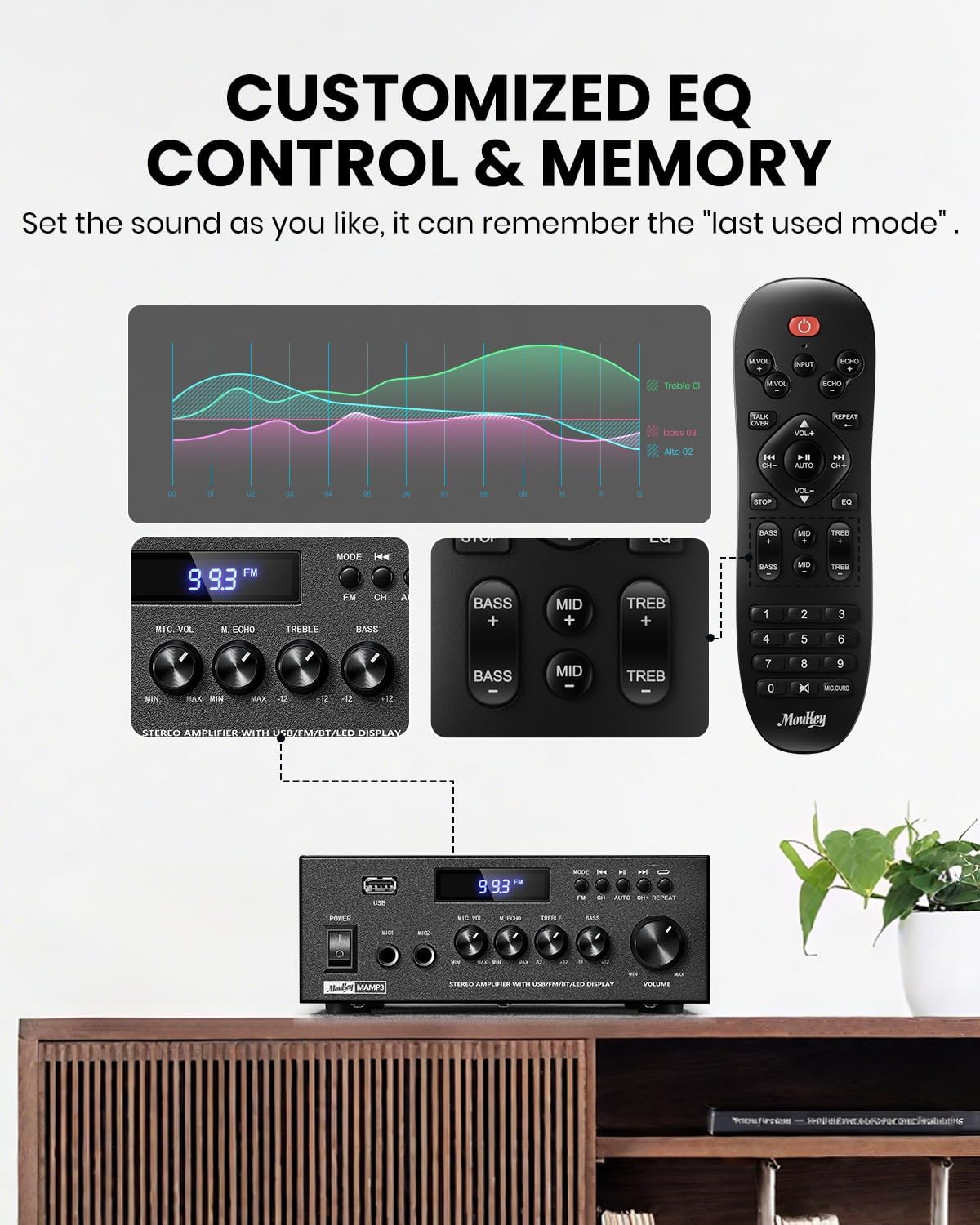
Image 5.1: Customizable EQ Control
5.5 Mikrofon boshqaruv elementlari
If microphones are connected, use the Mikrofonning ovoz balandligi tugmasi to adjust their output level and the Echo tugmasi to add an echo effect. The remote control also features a 'Talkover' function.
5.6 Bluetooth bilan ishlash
- ni bosing REJIM button until "BT" appears on the LED display. The amplifier is now in Bluetooth pairing mode.
- On your mobile device, enable Bluetooth and search for "Moukey MAMP3".
- Select "Moukey MAMP3" to pair. Once connected, you will hear a confirmation tone.
- Endi siz qurilmangizdagi audio fayllarni quyidagi orqali tinglashingiz mumkin amphayotiyroq.

Image 5.2: Bluetooth Pairing
5.7 FM radiosi bilan ishlash
- ni bosing REJIM button until "FM" appears on the LED display.
- Avtomatik skanerlash: Press the "AUTO" button on the remote to automatically scan and save available FM stations.
- Qo'lda sozlash: Use the number pad on the remote control to directly enter the desired FM frequency (e.g., for 101.1 MHz, enter 1011).
- dan foydalaning Oldingi va Keyingisi buttons to navigate between saved stations or fine-tune frequencies.
5.8 USB orqali tinglash
Insert a USB flash drive containing MP3 or WAV audio files ichiga USB uyasi. The amplifier will automatically switch to USB mode and begin playback. Use the Oldingi, Oʻynatish/toʻxtatib turish, va Keyingisi buttons to control playback. The Takrorlang button allows you to repeat the current track or all tracks.
5.9 masofadan boshqarish pulti
The included full-function remote control allows for convenient operation from a distance. It provides control over input selection, volume, EQ settings (treble, midrange, bass), microphone echo, and talkover functions across all input modes.

Image 5.3: Upgraded Remote Control Functionality
6. Xizmat ko'rsatish
- Tozalash: Tashqi qismini tozalash uchun yumshoq, quruq matodan foydalaning ampSuyuq tozalagichlar yoki erituvchilardan foydalanmang.
- Ventilyatsiya: Ensure that the ventilation openings are free from dust and debris to prevent overheating.
- Saqlash: Uzoq vaqt davomida foydalanilmaganda, uni saqlang ampto'g'ridan-to'g'ri quyosh nuri va haddan tashqari haroratdan uzoqda, salqin, quruq joyda.
7. Muammolarni bartaraf qilish; nosozliklarni TUZATISH
| Muammo | Mumkin sabab | Yechim |
|---|---|---|
| Quvvat yo'q | Elektr kabeli ulanmagan; Elektr rozetkasi nosoz; Elektr kaliti o'chirilgan. | Ensure power cord is securely connected; Test outlet with another device; Turn power switch on. |
| Ovoz chiqishi yo'q | Volume too low; Incorrect input selected; Speaker wires loose/incorrectly connected; Audio source issue. | Increase volume; Select correct input mode; Check speaker wire connections and polarity; Verify audio source is playing. |
| Bluetooth ulanmayapti | Amplifier not in BT mode; Device too far; Device already connected to another unit; Interference. | Oʻzgartirish amplifier to BT mode; Move device closer; Disconnect from other devices; Reduce interference. |
| Yomon FM qabul qilish | Antenna ulanmagan yoki noto'g'ri joylashtirilgan; Signal zaif. | Connect and adjust FM antenna position; Try auto-scan or manual tuning for stronger stations. |
| USB orqali ijro etish bilan bog'liq muammolar | Qo‘llab-quvvatlanmaydi file format; USB drive not formatted correctly; USB drive capacity too large. | Ta'minlash files are MP3/WAV; Format USB drive to FAT32; Use USB drives 32GB or less. |
8. Texnik shartlar
| Xususiyat | Spetsifikatsiya |
|---|---|
| Model raqami | MAMP3 |
| Chiqish quvvati | 300 vatt (cho'qqi) |
| Kanallar | 2.0 Stereo |
| Ulanish texnologiyasi | Auxiliary, Bluetooth 5.3, FM, USB |
| Mos qurilmalar | Smartphone, Tablet, Laptop, Computer, Speakers, CD/DVD Player |
| Ulagich turi | RCA, USB, 2 Mic input |
| Audio chiqish rejimi | Stereo |
| Mahsulot o'lchamlari | 6.1"D x 7.1"W x 2.8"Y (15.5 x 18.0 x 7.1 sm) |
| Element og'irligi | 2.14 funt (0.97 kg) |
| Rang | Qora |
8.1 Qutida nima bor
- Moukey MAMP3 Amphayotiyroq
- Masofadan boshqarish pulti
- FM antenna
- Foydalanuvchi uchun qo'llanma
- Quvvat adapteri
9. Kafolat va qo'llab-quvvatlash
9.1 Kafolat haqida ma'lumot
Moukey products are designed and manufactured to the highest quality standards. This product is covered by a limited warranty against defects in materials and workmanship. Please refer to the warranty card included with your purchase for specific terms and conditions, or visit the official Moukey webbatafsil kafolat ma'lumotlari uchun sayt.
9.2 Mijozlarni qo‘llab-quvvatlash
If you encounter any issues or have questions regarding your Moukey MAMP3 amplifier, please contact our customer support team. You can find contact information on the official Moukey websayt yoki xarid platformangiz orqali.
Websayt: www.moukey.com (Masalanample havolasi, iltimos, mahsulotning haqiqiy hujjatlariga qarang)
Email: support@moukey.com (Masalanample email, please refer to actual product documentation)


