1. Kirish
This manual provides essential information for the setup, operation, maintenance, and troubleshooting of your new Samsung QN43QN90FAFXZA 43-inch Neo QLED 4K Smart TV and the accompanying Austere 5S-4KHD2-2.5M V-Series 2.5m Premium 4K HDR HDMI Braided Cable. Please read this manual thoroughly to ensure proper use and to maximize your viewtajribasi.
2. Xavfsizlik ma'lumotlari
Always follow basic safety precautions when using electrical appliances to reduce the risk of fire, electric shock, and injury. Keep the TV away from water and moisture. Do not block ventilation openings. Use only specified attachments/accessories. Refer all servicing to qualified service personnel.
3. Sozlash
3.1 Qutidan chiqarish va komponentlarni aniqlash
Paketdagi barcha komponentlarni ehtiyotkorlik bilan olib tashlang. Quyidagi elementlar mavjudligiga ishonch hosil qiling:
- Samsung QN43QN90FAFXZA 43-inch Neo QLED 4K Smart TV
- Remote Control (BT SolarCell Remote)
- Quvvat kabeli
- Televizor stendining komponentlari (agar mavjud bo'lsa)
- Austere 5S-4KHD2-2.5M V-Series 2.5m Premium 4K HDR HDMI Braided Cable
- Hujjatlar (ushbu qo'llanma, kafolat kartasi)
3.2 Televizorni joylashtirish
Place the TV on a stable, level surface or mount it on a wall using a VESA 200mm x 200mm compatible wall mount (sold separately). Ensure adequate ventilation around the TV.

Figure 3.2.1: Samsung QN43QN90FAFXZA 43-inch Neo QLED 4K Smart TV with Austere HDMI cable.

3.2.2-rasm: Old view of the Samsung QN43QN90FAFXZA 43-inch Neo QLED 4K Smart TV.

3.2.3-rasm: yon view of the Samsung QN43QN90FAFXZA 43-inch Neo QLED 4K Smart TV.
3.3 Connecting the Austere HDMI Cable
The Austere 5S-4KHD2-2.5M V-Series HDMI cable is designed for optimal 4K HDR performance. Connect one end of the HDMI cable to an HDMI port on your TV and the other end to your external device (e.g., Blu-ray player, gaming console, soundbar). This cable supports HDMI ARC technology for enhanced audio return.

Figure 3.3.1: Austere 5S-4KHD2-2.5M V-Series 2.5m Premium 4K HDR HDMI Braided Cable.

Figure 3.3.2: Austere HDMI cable connected to a media device, demonstrating 18Gbps bandwidth for 4K60.

Figure 3.3.3: Austere HDMI cable connected to a receiver, highlighting High Quality Audio with ARC Technology.
3.4 Dastlabki yoqish va sozlash ustasi
Connect the power cable to the TV and a wall outlet. Press the power button on the remote control. The TV will guide you through the initial setup process, including network connection (Wi-Fi 5), channel scanning, and smart feature configuration.
4. Televizoringizni boshqarish
4.1 Masofadan boshqarish funksiyalari
Your BT SolarCell Remote allows for intuitive control of your TV. Use it to navigate menus, adjust volume, change channels, and access smart features. The remote can be charged via solar power or USB-C.
4.2 Aqlli funksiyalar (Tizen OS)
The TV runs on Samsung's Tizen Smart TV platform, providing access to various streaming services like Netflix, Prime Video, Disney+, Hulu, Apple TV, YouTube, HBO Max, Peacock, Sling, and more. Multiple Voice Assistant compatibility is also included.
4.3 Tasvir sifatini yaxshilash
Your Neo QLED TV features advanced technologies for superior picture quality:
- NQ4 AI Gen3 protsessori: Utilizes AI to deliver incredible 4K picture and dynamic sound.
- 4K AI yuksaltirish Pro: Content is upscaled to impressive 4K, improving viewing experience regardless of original resolution.
- Yorqinliksiz: Minimizes reflections, allowing clear viewing even in bright rooms.
- Neo Quantum HDR: Provides expanded contrast and powerful brightness for nuanced details in 4K clarity.
- AI Motion Enhancer Pro: Enhances motion clarity for fast-paced scenes.
- Haqiqiy Depth Enhancer Pro: Adds depth to images for a more immersive experience.
Video 4.3.1: Samsung QN90F Series TV Product Review. This video highlights key features and performance aspects of the QN90F series.

Figure 4.3.1: 4K AI Upscaling Pro in action, transforming content to a sharp, smooth 4K experience.
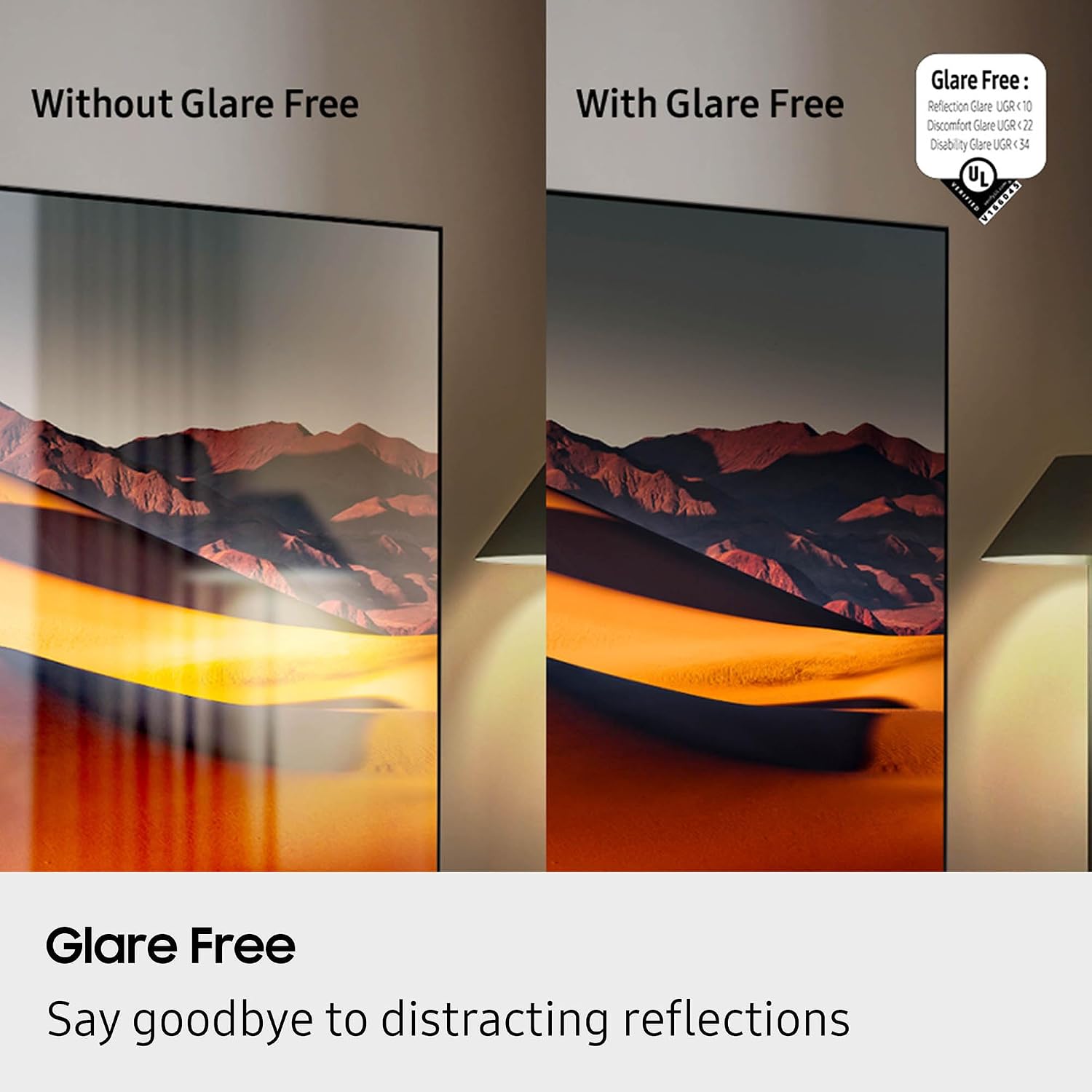
Figure 4.3.2: Glare Free technology reducing reflections for a clearer view.

Figure 4.3.3: The NQ4 AI Gen3 Processor, the core of the TV's intelligent performance.
4.4 Ovoz sifati xususiyatlari
Immersive audio bilan tanishing:
- Dolby Atmos: Delivers multi-dimensional sound that moves around you.
- OTS Lite (Object Tracking Sound Lite): Sound follows the action on screen for a more dynamic audio experience.
- Q-Symphony Pro: Synchronizes TV speakers with compatible Samsung soundbars for a richer soundstage.
- Bluetooth Audio: Simsiz minigarnituralar yoki karnaylarni ulang.
4.5 O'yin xususiyatlari
The TV offers a 120Hz (up to 165Hz) refresh rate and Motion Xcelerator 165Hz for smooth, responsive gaming.
4.6 Art Store
Transform your TV into a personal art gallery with the Art Store feature, displaying a vast collection of artwork when the TV is not in active use.
5. Xizmat ko'rsatish
5.1 Cleaning the TV Screen and Body
Ekranni yumshoq, quruq mikrofiber mato bilan muloyimlik bilan artib oling. O'jar dog'lar uchun, engil dampen the cloth with water or a screen-cleaning solution. Avoid harsh chemicals. Clean the TV body with a soft, dry cloth.
5.2 Dasturiy ta'minotni yangilash
Ensure your TV's software is up-to-date for optimal performance and security. You can usually find the update option in the TV's settings menu under 'Support' or 'Software Update'.
5.3 Austere HDMI Cable Care
Handle the HDMI cable by its connectors, not the cable itself, to prevent damage. Avoid sharp bends or kinks. Store the cable neatly when not in use.
Video 5.3.1: Austere 5 Series HDMI Product Video. This video showcases the design and features of the Austere 5 Series HDMI cable.
6. Muammolarni bartaraf qilish; nosozliklarni TUZATISH
6.1 Quvvat yo'q
- Elektr kabeli televizor va rozetkaga mahkam ulanganligini tekshiring.
- Boshqa qurilmani ulash orqali rozetkaning ishlashiga ishonch hosil qiling.
- Boshqa elektr rozetkasini sinab ko'ring.
6.2 Rasm yo'q yoki buzilgan rasm
- Televizorda to'g'ri kirish manbai tanlanganligini tekshiring.
- Check the HDMI cable connection between the TV and the external device. Try re-seating the cable or using a different HDMI port.
- Ensure the external device is powered on and functioning correctly.
- If using an antenna, check the antenna connection and perform a channel scan.
6.3 Ovoz yo'q yoki buzilgan tovush
- Televizorning ovoz balandligini tekshiring va uning ovozi o'chirilganligiga ishonch hosil qiling.
- If using external audio devices (soundbar, receiver), ensure they are powered on and connected correctly via HDMI ARC or optical cable.
- Check audio settings on both the TV and the external audio device.
6.4 Masofadan boshqarish pulti ishlamayapti
- Masofadan boshqarish pulti va televizor o'rtasida hech qanday to'siq yo'qligiga ishonch hosil qiling.
- Charge the BT SolarCell Remote using solar power or a USB-C cable.
- If the issue persists, try re-pairing the remote with the TV (refer to the TV's on-screen guide for specific instructions).
6.5 Tarmoqqa ulanish muammolari
- Check your Wi-Fi router and modem to ensure they are powered on and functioning.
- Router va modemni qayta ishga tushiring.
- Televizorning tarmoq sozlamalariga o'ting va Wi-Fi tarmog'ingizga qayta ulanishga harakat qiling.
- Agar simli ulanishdan foydalansangiz, Ethernet kabeli mahkam ulanganligiga ishonch hosil qiling.
7. Texnik shartlar
| Xususiyat | Spetsifikatsiya |
|---|---|
| Brend | Samsung |
| Model nomi | QN43QN90FAFXZA |
| Ekran o'lchami | 43 dyuym |
| Displey texnologiyasi | Neo QLED |
| Rezolyutsiya | 4K |
| Yangilanish tezligi | 120 Gts (165 Gts gacha) |
| Protsessor | NQ4 AI Gen3 protsessori |
| Maxsus xususiyatlar | AI Motion Enhancer Pro, Glare Free, Auto HDR Remastering Pro, Wide Viewing Angle, Ultimate UHD Dimming, Real Depth Enhancer Pro, Motion Xcelerator 165Hz, Film Mode, 4K AI Upscaling Pro, Color Booster Pro, Dolby Atmos, OTS Lite, Q-Symphony Pro, Bluetooth Audio, 360 Audio, Tizen Smart TV, Multiple Voice Assistant Compatible, Samsung Health, Eco Sensor, Auto Power Saving/Off, BT SolarCell Remote |
| Qo'llab-quvvatlanadigan Internet xizmatlari | Netflix, Prime Video, Disney+, Hulu, Apple TV, YouTube, HBO Max, Peacock, Sling va boshqalar |
| Mahsulot o'lchamlari | 8.7"D x 37.8"W x 24.4"Y |
| Element og'irligi | 29.5 funt |
| Rang | Titan qora |
| VESA muvofiqligi | 200 mm x 200 mm |
| HDMI portlari | 4 |
| USB-A portlari | 2 |
| Wi-fi | Wi-Fi 5 |
| HDMI kabel modeli | Austere 5S-4KHD2-2.5M |
| HDMI kabel uzunligi | 2.5m |
| HDMI Cable Features | Premium 4K HDR, Braided, HDMI ARC Technology, Silver-plated conductors |
8. Kafolat va qo'llab-quvvatlash
For warranty information regarding your Samsung TV, please refer to the warranty card included in your product packaging or visit the official Samsung support website. For support with your Austere HDMI cable, please refer to Austere's official documentation or websayt. Kafolat da'volari uchun xarid kvitansiyasini saqlang.


