Kirish
The CAS S2000 Jr is an NTEP certified electronic price computing scale designed for commercial use. This manual provides detailed instructions for the proper setup, operation, maintenance, and troubleshooting of your scale to ensure accurate and efficient performance. Please read this manual thoroughly before operating the device.
Xavfsizlik ma'lumotlari
- Always operate the scale on a stable, level surface to ensure accurate readings.
- Do not expose the scale to extreme temperatures, humidity, or direct sunlight.
- Avoid dropping the scale or subjecting it to strong impacts.
- Use only the provided AC adapter for power.
- Keep the scale clean and free from debris. Do not use abrasive cleaners.
- Tarozi o'zingiz qismlarga ajratishga yoki ta'mirlashga urinmang. Malakali xizmat ko'rsatish xodimlariga murojaat qiling.
Paket tarkibi
Paketda barcha elementlar mavjudligiga ishonch hosil qiling:
- CAS S2000 Jr Electronic Price Computing Scale Unit
- Stainless Steel Platter
- AC quvvat adapteri
- Foydalanuvchi uchun qo'llanma (ushbu hujjat)
Sozlash; o'rnatish
1. Paketni ochish va joylashtirish
Carefully remove the scale from its packaging. Place the scale on a firm, level surface, away from vibrations, drafts, and direct heat sources. Ensure adequate space for operation and display visibility.
2. Installing the Platter
Gently place the stainless steel platter onto the scale's weighing platform. Ensure it sits securely and does not wobble.
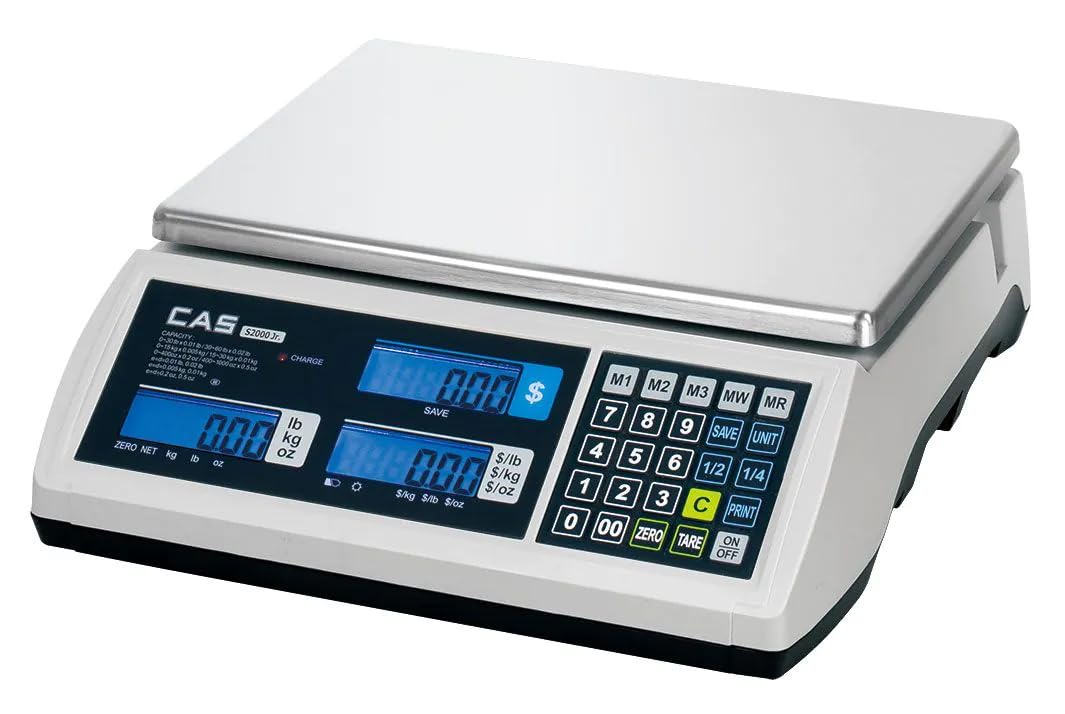
Image: The CAS S2000 Jr Electronic Price Computing Scale with its stainless steel platter correctly installed on the weighing platform. The scale features three blue backlit LCD displays on the front panel.
3. Quvvatga ulanish
Connect the AC power adapter to the scale's power input port and then plug it into a standard electrical outlet. The scale also features a rechargeable battery, providing up to 200 hours of operation, allowing for portability and use in areas without immediate AC power. Ensure the battery is sufficiently charged before portable use.
4. Miqyosni tekislash
The scale must be perfectly level for accurate measurements. Adjust the leveling feet located at the bottom of the scale until the bubble in the level indicator (if present) is centered. If no bubble level is present, ensure the scale is stable and does not rock.
Foydalanish bo'yicha ko'rsatmalar
1. Quvvatni yoqish/o‘chirish
ni bosing [ON/OFF] button to turn the scale on. The display will perform a self-test and then show '0.00' or '0.000'. Press and hold the [ON/OFF] button to turn the scale off.
2. Asosiy tortish
Place the item to be weighed on the center of the stainless steel platter. The weight will be displayed on the left LCD screen. The scale supports measurements in pounds (lb), kilograms (kg), and ounces (oz). Use the [UNIT] button to cycle through the desired unit of measurement.
3. Idishning funktsiyasi
To subtract the weight of a container, place the empty container on the platter and press the [TARE] button. The display will reset to zero. You can then add the product to the container, and only the net weight of the product will be displayed.
4. Price Computing
The S2000 Jr features dual displays, allowing both the operator and customer to view the total price, weight, and unit price simultaneously. To compute the price:
- Place the item on the platter to get its weight.
- Enter the unit price using the numeric keypad. The unit price will appear on the middle display.
- The total price will be calculated and shown on the right display.
5. Price Look-Up (PLU) Options
The scale includes Price Look-Up (PLU) options to store and recall frequently used item prices. Refer to the detailed PLU programming section in the full manual for specific instructions on how to program and recall PLU items. This feature streamlines the retail experience by quickly recalling piece weight and cost.
Xizmat
1. Tozalash
Wipe the scale's surface and stainless steel platter with a soft, damp cloth. Use a mild detergent if necessary. Do not use abrasive cleaners, solvents, or immerse the scale in water. Ensure the scale is dry before use.
2. Batareyani parvarish qilish
To maximize battery life, fully charge the scale before its first use and after extended periods of storage. Avoid completely draining the battery frequently. If the scale will not be used for a long time, charge it periodically to maintain battery health.
3. Saqlash
When not in use, store the scale in a clean, dry environment, away from extreme temperatures and direct sunlight. Protect it from dust and potential physical damage.
Muammolarni bartaraf qilish; nosozliklarni TUZATISH
| Muammo | Mumkin sabab | Yechim |
|---|---|---|
| Tarozi yoqilmaydi | No power, discharged battery, faulty adapter | Check AC adapter connection. Charge the battery. Ensure power outlet is functional. |
| Noto'g'ri o'qishlar | Not level, unstable surface, drafts, overload, dirty platter | Level the scale. Place on a stable surface. Avoid drafts. Do not exceed weight limit. Clean platter. |
| Display shows 'OVERLOAD' | Og'irlik maksimal sig'imdan oshib ketadi | Remove excess weight immediately to prevent damage. |
| Displey xira yoki miltillaydi | Kam batareya | Connect the scale to AC power and charge the battery. |
Texnik xususiyatlari
| Xususiyat | Tavsif |
|---|---|
| Brend | CAS |
| Model | S2000 Jr |
| Og'irlik cheklovi | 60 funt (27.2 kg) |
| O'qishning aniqligi | 0.005 funt (2 g) |
| Displey turi | Orqa nurli LCD |
| Maxsus xususiyatlar | Dual Displays, Price Look-Up Options, Rechargeable Battery, NTEP Certification |
| Quvvat manbai | AC Adapter, Rechargeable Battery (up to 200 hours operation) |
| Rang | Oq |
| Form faktor | Hisoblagich shkalasi |
| UPC | 850072510187 |
Kafolat haqida ma'lumot
CAS products are manufactured under strict quality control standards. This product is covered by a limited warranty against defects in materials and workmanship. The specific terms and duration of the warranty may vary by region. Please retain your proof of purchase for warranty claims. For detailed warranty information, refer to the warranty card included with your product or visit the official CAS websayt.
Mijozlarni qo‘llab-quvvatlash
If you encounter any issues or have questions regarding your CAS S2000 Jr scale that are not addressed in this manual, please contact CAS customer support. You can typically find contact information (phone number, email, or support portal) on the official CAS websayt yoki mahsulot o'ramida.


