1. Kirish
This manual provides essential information for setting up, operating, and maintaining your Machenike Mini Desktop. Please read this manual thoroughly before using the device to ensure proper functionality and longevity.
The Machenike Mini Desktop, model GTR HP8745H00, is a compact and powerful computing solution featuring an AMD Ryzen 7 8745HS processor, AMD Radeon Graphics, 32GB DDR5 RAM, and a 1TB SSD, running on Windows 11 Home.
2. Paket tarkibi
Paketda barcha elementlar mavjudligiga ishonch hosil qiling:
- Machenike Mini Desktop (GTR HP8745H00)
- Quvvat adapteri
- Foydalanuvchi uchun qo'llanma (ushbu hujjat)
- (Additional accessories may vary by region or bundle)
3. Mahsulot tugadiview
The Machenike Mini Desktop is designed for efficiency and performance in a small form factor. Below is an illustration of the device and its various ports.

Rasm: old view of the Machenike Mini Desktop, showcasing its compact design and front-facing ports.
3.1. Port Layout
Familiarize yourself with the available ports for connecting peripherals and displays.
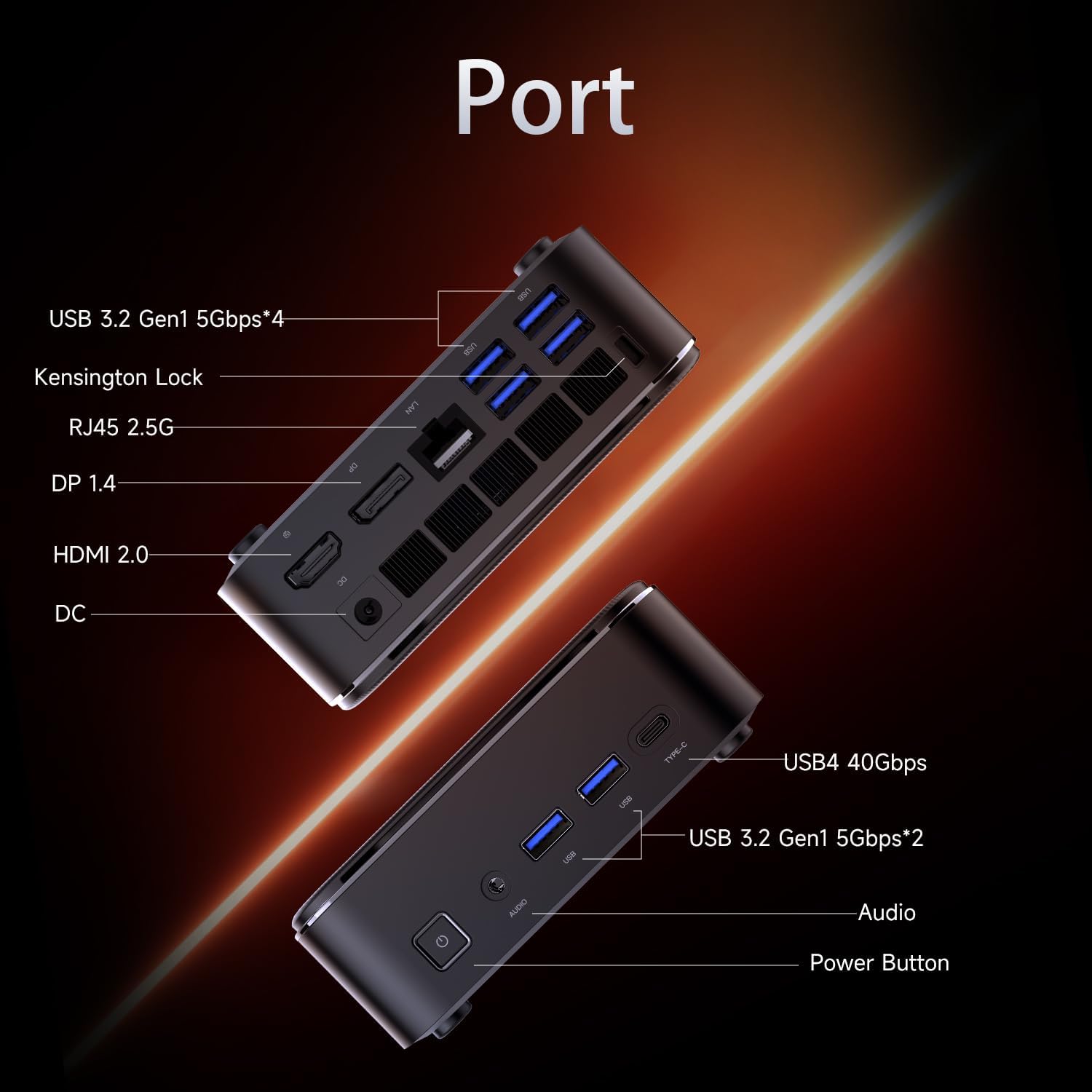
Image: Diagram illustrating the various ports on the Machenike Mini Desktop, including USB, Type-C, HDMI, DisplayPort, RJ45, and audio connections.
- Old portlar: Power Button, 3.5mm Audio Jack, 2 x USB 3.2 Gen1 (5Gbps), 1 x Type-C (USB4 40Gbps)
- Orqa portlar: 2 x USB 3.2 Gen1 (5Gbps), 1 x USB 3.2 Gen2 (10Gbps), 1 x Type-C, 1 x HDMI 2.1, 1 x RJ45, 1 x Display Port, DC Power Input, Kensington Lock Slot, Restart Button
4. Dastlabki sozlash
Follow these steps to set up your Machenike Mini Desktop:
- Displeyni ulash: Connect your monitor or display to the Mini Desktop using an HDMI or DisplayPort cable. The device supports 4K resolution.
- Periferik qurilmalarni ulang: Plug in your keyboard, mouse, and any other USB devices into the available USB ports.
- Quvvatni ulash: Connect the power adapter to the DC power input port on the Mini Desktop, then plug the adapter into a power outlet.
- Yoqilgan: Press the power button located on the front of the device. The system will boot up.
- Windows sozlamalari: Til, mintaqa, tarmoq ulanishi va foydalanuvchi hisobini yaratish kabi dastlabki Windows 11 Home sozlamalarini bajarish uchun ekrandagi ko‘rsatmalarga amal qiling.
5. Foydalanish bo'yicha ko'rsatmalar
5.1. Quvvatni yoqish/o‘chirish
- Yoqilgan: Qurilmaning old qismidagi quvvat tugmasini bosing.
- O'chirish; yopish: Windows-da Boshlash tugmasini bosing, so'ngra Quvvat > O'chirish-ni tanlang.
- Qayta ishga tushirish: Windows-da Ishga tushirish tugmasini bosing, keyin Quvvat > Qayta ishga tushirish-ni tanlang.
5.2. Tarmoqqa ulanish
- Wi-fi: The device supports Wi-Fi 6. During Windows setup or via Windows Settings, select your Wi-Fi network and enter the password.
- Simli (Ethernet): Connect an Ethernet cable from your router or modem to the RJ45 port on the back of the Mini Desktop.
5.3. Tashqi qurilmalarni ulash
- USB qurilmalari: Connect USB flash drives, external hard drives, printers, or other USB peripherals to any available USB 3.2 Gen1 or Gen2 ports.
- Type-C Devices: Use the Type-C ports for compatible devices, including high-speed data transfer (up to 40Gbps on the front Type-C port) or display output.
- Audio: Connect headphones or speakers to the 3.5mm audio jack on the front.
- Bluetooth: The device supports Bluetooth for wireless peripherals like keyboards, mice, and speakers. Pair devices through Windows Settings > Bluetooth & devices.
6. Xizmat ko'rsatish
Regular maintenance helps ensure optimal performance and extends the lifespan of your Mini Desktop.
- Tozalash: Use a soft, dry cloth to clean the exterior. For dust accumulation in vents, use compressed air. Ensure the device is powered off and unplugged before cleaning.
- Dasturiy ta'minot yangilanishlari: Tizim barqarorligi va xavfsizligini ta'minlash uchun Windows yangilanishlari va drayver yangilanishlarini muntazam tekshirib turing va o'rnating.
- Ventilyatsiya: Ensure the Mini Desktop is placed in a well-ventilated area. Avoid blocking the air vents to prevent overheating.
- Ma'lumotlarni zaxiralash: Vaqti-vaqti bilan muhim ma'lumotlarni tashqi disk yoki bulutli xotiraga zaxiralang.
7. Muammolarni bartaraf qilish; nosozliklarni TUZATISH
Ushbu bo'lim siz duch kelishi mumkin bo'lgan umumiy muammolarni ko'rib chiqadi.
- Quvvat yo'q:
- Ensure the power adapter is securely connected to both the Mini Desktop and a working power outlet.
- Elektr rozetkasini boshqa qurilma bilan tekshiring.
- Displey yo'q:
- Verify that the HDMI or DisplayPort cable is securely connected to both the Mini Desktop and the monitor.
- Monitor yoqilganligiga va to'g'ri kirish manbasiga o'rnatilganligiga ishonch hosil qiling.
- Try a different cable or monitor if available.
- Internetga ulanish yo'q:
- For Wi-Fi, check if the Wi-Fi adapter is enabled in Windows Settings and if you are connected to the correct network with the right password.
- For wired connection, ensure the Ethernet cable is properly connected and your router/modem is working.
- Bluetooth ulanishi bilan bog'liq muammolar:
- Ensure Bluetooth is enabled in Windows Settings.
- Remove and re-pair the problematic Bluetooth device.
- Update Bluetooth drivers through Device Manager.
- Ensure the device is within range and fully charged.
- Tizimning sekinlashishi:
- Check Task Manager for resource-intensive applications.
- SSD-da etarli bo'sh joy mavjudligiga ishonch hosil qiling.
- Diskni tozalash va defragmentatsiyani ishga tushiring (HDD uchun, lekin SSD disklari defragmentatsiyaga muhtoj emas).
- Perform a malware scan.
8. Texnik shartlar
Detailed technical specifications for the Machenike Mini Desktop (GTR HP8745H00):
| Xususiyat | Spetsifikatsiya |
|---|---|
| Model | GTR HP8745H00 |
| Protsessor | AMD Ryzen 7 8745HS (8 Cores, 16 Threads, 16MB L3 Cache, up to 5.1 GHz) |
| Grafika | AMD Radeon Grafikasi (Integratsiyalashgan) |
| Ram | 32 GB DDR5 (4800 MGts) |
| Saqlash | 1TB PCIe M.2 SSD |
| Operatsion tizim | Windows 11 Bosh sahifa |
| Simsiz ulanish | Wi-Fi 6 (802.11ax), Bluetooth |
| Old portlar | 1 x Power Button, 1 x 3.5mm Audio, 2 x USB 3.2 Gen1 (5Gbps), 1 x Type-C (USB4 40Gbps) |
| Orqa portlar | 2 x USB 3.2 Gen1 (5Gbps), 1 x USB 3.2 Gen2 (10Gbps), 1 x Type-C, 1 x HDMI 2.1, 1 x RJ45, 1 x Display Port, DC Power Input, Kensington Lock, Restart Button |
| Maksimal ekran o'lchamlari | 3840 x 2160 (4K) |
| Olchamlari (UxKxY) | 5.05 x 1.96 x 5.05 dyuym |
| Og'irligi | 3.4 funt |
| Rang | Qora |
9. Kafolat va qo'llab-quvvatlash
Machenike products are covered by a limited warranty. For specific warranty terms and conditions, please refer to the warranty card included with your product or visit the official Machenike websayt.
For technical support, troubleshooting assistance, or to inquire about service, please contact Machenike customer support or visit the official brand store:


