Kirish
This manual provides detailed instructions for the setup, operation, and maintenance of your GUSTARD R30 Fully-Discrete R2R Network Streamer DAC. Please read this manual thoroughly before using the device to ensure optimal performance and longevity.
Paket ro'yxati
Paketni ochgandan so'ng, quyidagi elementlarning barchasi kiritilganligini tekshiring:
- GUSTARD R30 Mainframe
- Quvvat kabeli
- USB kabeli
- Masofadan boshqarish
- Kafolat kartasi

Old panel tepadaview
The front panel of the GUSTARD R30 features essential controls and a display for real-time status and operations.
- Quvvat tugmasi: Toggles between standby and active states. The R30 can remain in standby mode when the rear power switch is ON.
- Ko'rish maydoni: Shows the current input channel, encoding format, and sampling rate. Displays menu items when in the setup menu.
- Ovoz balandligini ko'rsatish: Indicates the current volume level, ranging from -63.5dB to 0dB. 'FIXED' indicates bypass mode. Displays menu options during configuration.
- '-' tugmasi: Normally decreases volume. Cycles through options in the menu.
- Vites tugmasi: Short press switches inputs. Long press enters/exits the menu. Short press navigates items in the menu.
- '+' tugmasi: Normally increases volume. Cycles through options in the menu.

Orqa panel tugadiview
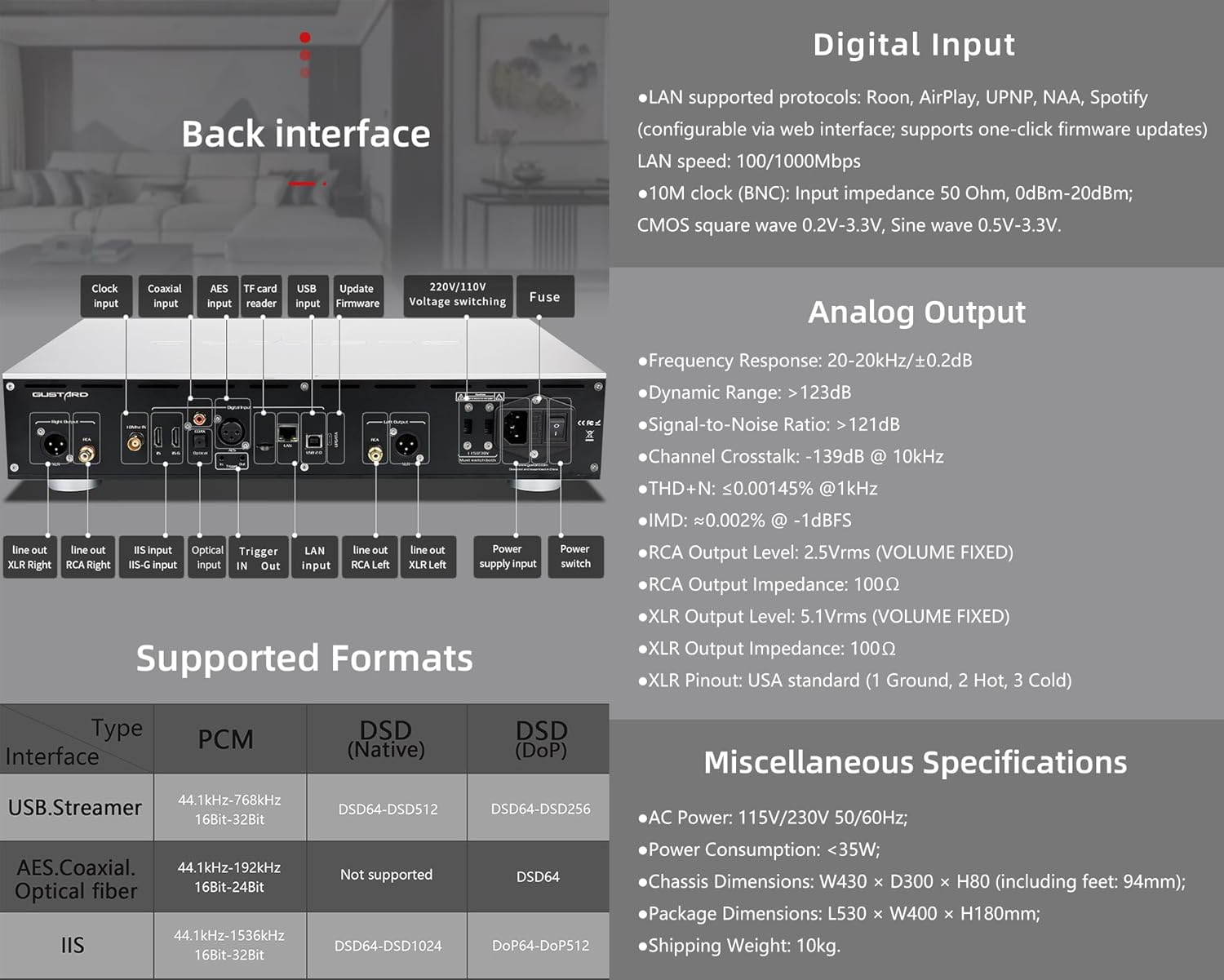
The rear panel provides various input and output connections for the GUSTARD R30.
- Soat kiritish: For external 10MHz clock synchronization.
- Koaksiyal kiritish: Raqamli audio kirish.
- AES kiritish: Raqamli audio kirish.
- USB usuli: For connecting to a computer or other USB audio source.
- LAN Input: For network streaming functionality.
- TF kartani o'quvchi: Mikrodastur yangilanishlari uchun.
- Mikrodasturni yangilash: Mikrodasturlarni yangilash uchun USB port.
- 220V/110V Voltage Kommutatsiya: Selector for power voltage.
- Sug'urta: Quvvat sug'urtasi.
- Line Out XLR Right/Left: Balanced analog audio outputs.
- Line Out RCA Right/Left: Unbalanced analog audio outputs.
- IIS Input (IIS-G): Digital audio input with Gustard pinout.
- Optik kirish: Raqamli audio kirish.
- Kirish/chiqishni ishga tushirish: For 12V trigger control.
- Quvvat manbai kirishi: AC power connection.
- Quvvat tugmasi: Main power toggle.
Important: Ensure both voltage kalitlari bir xil hajmga o'rnatiladitage 220V/110V voltage switch, otherwise, it may damage the internal transformer upon powering on.
Displey va panel boshqaruvlari
The R30 utilizes a large OLED display for real-time status monitoring and functional operations. The diagram below illustrates the main interface display states.
1. OLED displey
The display shows the input channel, external clock indication, encoding format, sampling rate, and volume.
2. Input Channel Selection
R30 7 ta kirish kanaliga ega. Asosiy interfeysda Gear tugmasini har bir bosish quyidagi ketma-ketlikda mavjud kanallar bo‘ylab aylanadi: COAX → AES → OPT → USB → STREAMER → IIS(G) → IIS(M*).
***Note: IIS(G) is for fixed Gustard pinout configuration and cannot be adjusted. IIS(M*) supports adjustable pinout configuration.
3. Ovoz balandligini sozlash
- When the main interface is displayed, pressing the "+" or "-" buttons directly adjusts the analog volume attenuation function of the passive preampko'taruvchi. Zaiflash 0dB dan -63.5dB gacha (jami 63.5dB zaiflashuv) oralig'ida.
- Pressing "+" at 0dB activates Fixed Output mode (bypassing attenuation circuit), displaying 'FIXED' indicator.
- When 'FIXED' is displayed, pressing "-" first exits bypass mode before controlling the attenuation level.

Sozlash menyusi
On the main screen, long press the Gear Button to enter the settings menu (hereinafter referred to as the menu button). In this state, the menu button can sequentially switch the menu items to be modified. "+" and "-" buttons are used to adjust the currently selected menu options. When the screen is in the settings menu, long press the menu button again to return to the main screen.
Menyu tarkibi:
- PCM FILTRI
- DSD FILTRI
- NOS REJIMI
- REF CLOCK
- IIS MODE
- PHASE
- TRIGGER CH.
- TRIGGER VOL.
- DISPLAY

Menyu funktsiyalari
Asosiy interfeysdagi Menyu tugmasini bosish orqali menyuga kiring. Har bir menyu varianti quyida batafsil tavsiflangan.
1. PCM FILTER (PCM Digital Filter Adjustment)
R30 o'z-o'zidan ishlab chiqilgan yuqori samarali PCM overs-dan foydalanadiampling raqamli filtr moduli uchta filtr turiga ega:
- VIVID (Default): Similar to the FAST roll-off type of traditional digital filter, but with better ringing characteristics, very small pre-ringing, and fast convergence post-ringing. It aims for a broad soundstage and sound restoration. Recommended for most music styles.
- GENTLE: Similar to the SLOW roll-off type of traditional digital filter, offering a soft listening experience.
- Tarkibi: A hybrid digital filter, balancing characteristics between Vivid and Gentle for a good listening experience.
2. DSD FILTER (DSD Digital Filter Adjustment)
DSD filtrida 4 ta o'rnatilgan tarmoqli kengligi opsiyasi mavjud: 47K (Default), 50K, 60K, 70K.
3. NOS REJIMI (Oddiy rejimampling Filter Mode)
When enabled, the PCM signal bypasses the oversampling filter entirely, decoded straight through the R-2R decoder module. This preserves micro-details and timing integrity. When enabled, there may be a slight clicking sound when the playback data format switches between PCM and DSD.
- DISABLE (Default)
- YOQISH
4. REF CLOCK (Reference Clock Selection)
The GUSTARD-K2, low-noise clock synthesizer, achieves ultra-low jitter performance. The R30 offers two clock options:
- INTERNAL (Default): Uses the built-in OCXO internal reference.
- EXT. 10MHz: Selects an external 10MHz reference source. It is recommended to connect to GUSTARD C16 or C18 reference 10M master clocks.
If the external clock is lost, powered off, or its frequency deviation is greater than +/-150ppm, "EXT ERR" will be displayed and flash.
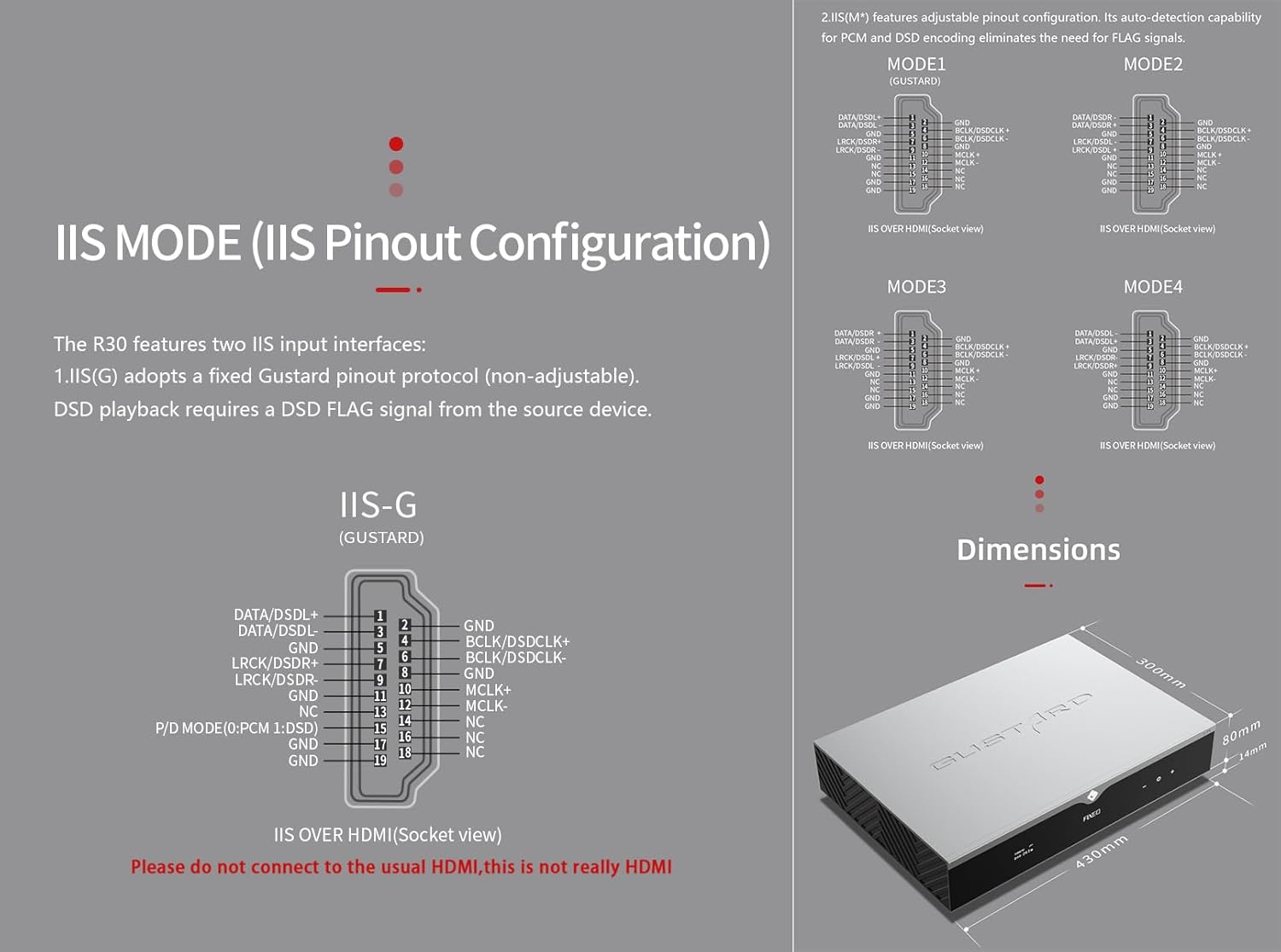
5. IIS MODE (IIS Pinout Mode Selection)
R30 ikkita IIS kiritish interfeysiga ega:
- IIS(G): Fixed Gustard pinout protocol (non-adjustable). DSD playback requires a DSD FLAG signal from the source device.
- IIS(M*): Features adjustable pinout configuration. Its auto-detection capability for PCM and DSD encoding eliminates the need for FLAG signals.
IIS(M*) adjustable Pinout mode IIS input has four Pinouts: MODE1 (Default), MODE2, MODE3, MODE4. MODE1 is compatible with the GUSTARD mode. If you are connecting to a GUSTARD front end such as U12, U16, U18, S16, S26, etc., you can match them with MODE1, which is the former works in the Gustard output mode.
Please do not connect to the usual HDMI, this is not really HDMI.
6. PHASE (Phase Setting)
Ushbu funktsiya ikkita variantni taklif qiladi:
- NON-inverted (Default): When non-inverted, the RCA output of R30 is normal phase, and the XLR balanced output is American standard polarity output (1 ground, 2 hot, 3 cold).
- Teskari: When inverted, only the RCA output is reverse phase, and the XLR balanced output is Japanese/European standard polarity output (1 ground, 2 cold, 3 hot).
7. TRIGGER CH. (Linkage Trigger Start Channel Selection)
The R30 can be triggered by an external 12V linkage signal and automatically turn on from standby mode. When the 12V trigger signal ceases or drops to 0V, automatic standby activation occurs. When the R30 is working, it is switched to the input channel of this setting by the 12V trigger linkage signal.
- LAST (Default): The input channel that was in use before entering standby last time.
- Other options include COAX, AES, OPT, USB, STREAMER, IIS(G), IIS. Selecting any channel activates it upon receiving a 12V trigger signal.
8. TRIGGER VOL. (Link Trigger Boot Volume Selection)
R30 tashqi 12V tetik signali orqali kutish rejimidan yoqilishi va avtomatik ravishda tanlangan ovoz balandligiga o'rnatilishi mumkin. Shu bilan bir qatorda, ish paytida, 12V tetik signali chiqishni oldindan belgilangan ovoz balandligiga o'tkazadi. Ushbu parametr trigger faollashtirilgandan keyin chiqish hajmini sozlaydi.
- LAST (Default): The volume used before entering standby.
- TUZILGAN: Fixed full-scale output bypassing attenuation.
- -20dB: Output at a volume attenuated to -20dB.
- -30dB: Output at a volume attenuated to -30dB.
- -40dB: Output at a volume attenuated to -40dB.
9. DISPLAY (Screen Brightness Settings)
Long-term high-brightness use of OLED screens can cause screen burn-in or ghosting. Therefore, the R30 is designed to always select automatic screen off, or manually select automatic screen off, which can also reduce interference.
- AUTO (Default): Automatically reduce brightness.
- AVTO YO'Q: Automatically turn off the screen.
Infraqizil masofadan boshqarish pulti
DAC mahsulotlarini ishlatganda, DAC boshqaruv rejimiga kirish uchun DAC tugmasini 3 soniyadan ko'proq bosib turing. AMP/STREAM rejimlari boshqa Gustard mahsulotlarini boshqaradi.
- Kuting: Press once to activate R30 from standby. Press once during operation to enter standby.
- Menyu: Press to access R30's setup menu.
- 4 ta yo'nalish tugmalari bo'lgan pad: Up/Down navigates menu items. Left/Right adjusts selected options. Center press activates/deactivates mute.
- Orqaga: Returns to main interface.
- Vol-: Decreases output volume on main interface.
- Jildi+: Increases output volume on main interface.
Eslatmalar:
- Operational range varies with angle.
- Obstructions between remote and sensor may cause malfunction.
- Remove batteries if unused for more than 1 month.
- Thoroughly clean battery compartment if leakage occurs.
- May accidentally trigger other IR-controlled devices.

Network Bridge Streamer Tez boshlash
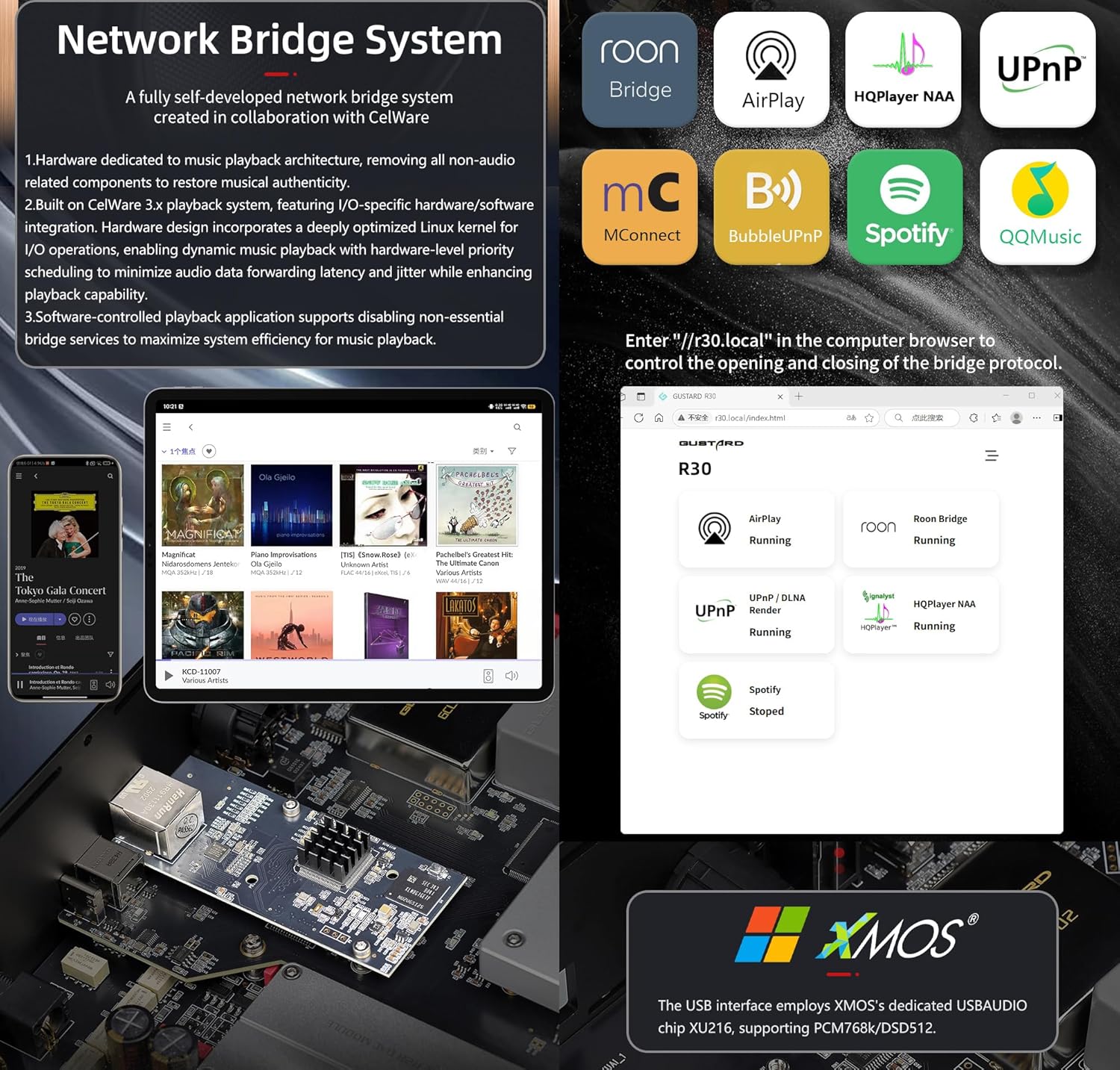
After connecting R30's RJ45 port to your local network:
- Select the STREAMER channel and await system boot (approximately 1 minute, until "DSD 24.5MHz" appears).
- Access R30's configuration page via: http://R30.local (as shown below). Disable unused streaming protocols on the web tizim samaradorligini oshirish uchun interfeys. Mikrodasturlarni yangilash ham shu yerda amalga oshiriladi.
(Mobil/planshet bilan ishlash maxsus ilova chiqarilgunga qadar kutilmoqda)
You can turn off streaming protocols that are not frequently used through the web page to maximize system music playback performance. At the same time, the online upgrade of the Streamer is also operated on the web sahifa.
(Maxsus Streamer APP ishga tushirilgandan so'ng, yuqoridagi amallarni APPda bajarish mumkin)
Official Product Video: GUSTARD R30 - User Manual
Mahsulot spetsifikatsiyalari
Digital Input Support Formats:
| Turi | PCM | DSD (mahalliy) | DSD (DoP) |
|---|---|---|---|
| USB.Streamer | 44.1kHz-768kHz 16Bit-32Bit | DSD64-DSD512 | DSD64-DSD256 |
| AES.Coaxial.Optical fiber | 44.1kHz-192kHz 16Bit-24Bit | Qo'llab-quvvatlanmaydi | DSD64 |
| IIS | 44.1kHz-1536kHz 16Bit-32Bit | DSD64-DSD1024 | DoP64-DoP512 |
Analog chiqish:
- Chastota javobi: 20-20kHz/±0.2dB
- Dinamik diapazon:> 123 dB
- Signal-shovqin nisbati:> 121dB
- Kanallar orasidagi o'zaro bog'liqlik: -139dB @ 10kHz
- THD+N: ≤ 0.00145% @1kHz
- IMD: ≈0.002% @ -1dBFS
- RCA chiqish darajasi: 2.5 Vrms (OVOZI RO'G'L)
- RCA Output Impedance: 100Ω
- XLR Chiqish darajasi: 5.1Vrms (OVOZI RO'G'AR)
- XLR Output Impedance: 100Ω
- XLR Pinout: AQSh standarti (1 yer, 2 issiq, 3 sovuq)
Boshqa spetsifikatsiyalar:
- AC Power: 115V/230V 50/60Hz
- Quvvat iste'moli: <35W
- Chassis Dimensions: W430 × D300 × H80 (including feet: 92mm)
- Package Dimensions: L530 × W400 × H180mm
- Shipping Weight: 10kg (with package)
- 10MHz BNC Input: Input impedance 50 Ohm, 0dBm-20dBm; CMOS square wave 0.2V-3.3V, Sine wave 0.5V-3.3V.
- Trigger: IN- 12V Typ. OUT- 12V Typ.
Kafolat shartlari
Thank you for choosing GUSTARD HIFI products. To safeguard your rights and interests, please read the following warranty terms carefully. You can promptly obtain comprehensive after-sales service provided by GUSTARD.
Mahsulot kafolati
You will enjoy a 2-year free warranty and lifetime maintenance after the date of purchasing GUSTARD's HIFI product.
* Ishlab chiqaruvchi faqat Xitoy materikidan yuklarni o'z zimmasiga oladi. Chet eldan olinadigan yuk va soliqning bir qismi foydalanuvchi tomonidan dilerlik muzokaralari bilan hal qilinadi.
Bepul kafolat xizmati
GUSTARD R30 from the purchasinBepul kafolat muddati tugagan sanada, foydalanuvchi mahsulotni normal rejimda ishlatadi va mahsulot komponent sifati yoki ishlab chiqarish muammolari tufayli ishdan chiqadi.
Kafolat xizmatidan tashqari
Belonging to one of the following circumstances, products are no longer provided warranty service:
- Sotib olingan kundan boshlab mahsulot oldindan belgilangan kafolat muddatidan oshib ketgan.
- Model, shtrix kodlar va sotib olingan sana haqiqiy mahsulot va kafolat kartasiga mos kelmaydi.
- Without GUSTARD technician permission, unauthorized modifications to the circuit, components or self-repaired product.
- Chidab bo'lmas tabiiy kuchlar ta'sirida zarar.
- Atrof-muhitga zarar etkazuvchi ruxsat etilgan foydalanishdan tashqari.
- Noto'g'ri foydalanish yoki noto'g'ri saqlash natijasida shikastlanish. Jumladan, lekin ular bilan cheklanmagan holda: jildtagelektron sxemalar yoki komponentlarni yoqish uchun juda baland; Bumping va natijada qobiq yoki ichki qismga zarar etkazish; suv, yog ', suyuqlik va ortiqcha chang tufayli shikastlanish; mahsulot oksidlanishi yoki korroziyasi va boshqalar.
- Kafolat muddatidan tashqari, masalan, individual komponentning shikastlanishi, insonning shikastlanishi sababli tashqi ko'rinishi, proshivka o'zgarishlari ruxsatsiz foydalanuvchilar tomonidan ishlay olmasligiga olib keladi. GUSTARD oʻrtacha texnik toʻlovlarni olish majburiyatini oladi (katta maydon komponentlari yoki taʼmirlab boʻlmaydigan yonib ketgan elektron platadan tashqari). Yuk tashish va texnik xizmat ko'rsatish xarajatlari, moddiy xarajatlar foydalanuvchi tomonidan talab qilinadi.
Bog'lanish uchun ma'lumot
Ishlab chiqaruvchi: Shenzhen Goshide Technology Co., LTD
Manzil: Room 302, Building 1, No. 28, Huimin 1st Road, Guanlan Sub-district, Longhua District, Shenzhen City, Guangdong Province
Tel: +86-18682080102
Websayt: http://www.gustard.com
Email: service@gustard.com


