1. Mahsulot tugadiview
The Mars Gaming MC-3TCORELCD is an ATX gaming case designed for PC enthusiasts. It features an integrated 7.2-inch IPS screen, triple removable tempered glass panels, and a dual-chamber structure for efficient cable management and optimized airflow. This manual provides instructions for assembly, operation, and maintenance of the MC-3TCORELCD case.

Figure 1: Mars Gaming MC-3TCORELCD ATX Gaming Case.
2. O'rnatish va o'rnatish
This section details the steps for installing your components into the MC-3TCORELCD case.
2.1 Ishni tayyorlash
- Yon panellarni olib tashlash: The MC-3TCORELCD features triple tempered glass panels that are removable without screws. Carefully detach the front, side, and central panels to access the interior.
- Aksessuarlar to'plami: Locate the accessory kit containing screws, cable ties, and other mounting hardware.

2-rasm: Panoramik view with removable triple tempered glass for easy access.
2.2 Anakartni o'rnatish
The case supports ATX, MicroATX, and Mini-ITX motherboards, including those with inverted connectors.
- Standofflarni o'rnatish: Ensure the correct standoffs are installed for your motherboard form factor.
- Anakartni o'rnatish: Carefully place the motherboard onto the standoffs and secure it with the provided screws.
2.3 Drayvni o'rnatish
The case provides internal bays for storage devices.
- 3.5 dyuymli qattiq disk: Up to 2x 3.5" HDDs can be installed.
- 2.5 dyuymli SSD: Up to 3x 2.5" SSDs can be installed.
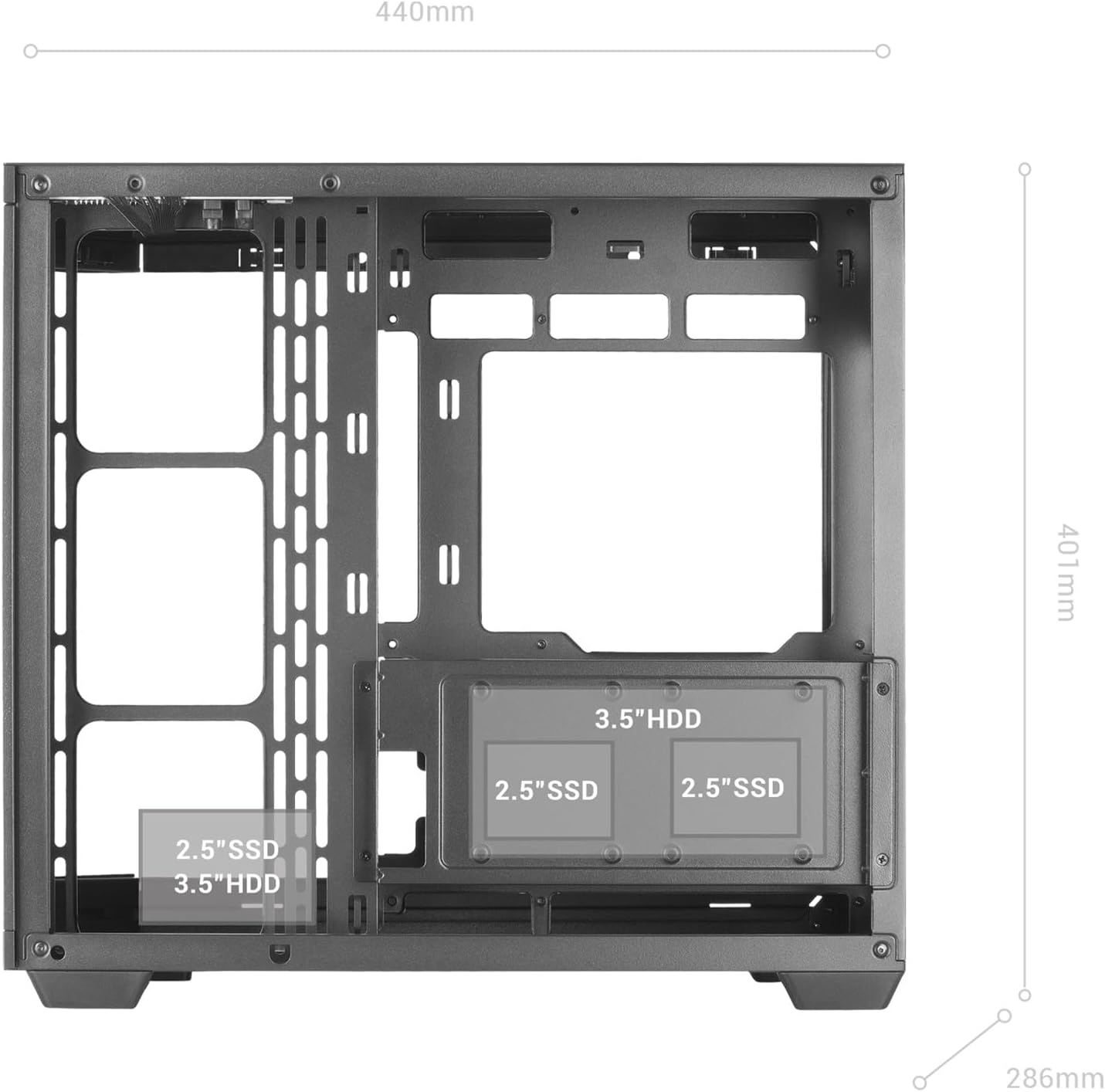
Figure 3: Internal layout indicating drive bay positions.
2.4 Power Supply and Cable Management
The dual-chamber design facilitates clean cable routing.
- Elektr ta'minotini o'rnatish: Mount your ATX power supply in the designated bottom-mount area.
- Yo'nalish kabellari: Utilize the dual-chamber structure to route cables behind the motherboard tray, minimizing clutter and improving airflow.

Figure 4: Double side chamber for efficient cable management.
2.5 Sovutish tizimini o'rnatish
The case supports extensive air and liquid cooling solutions.
- Muxlislar: Install up to 10x 120mm fans or a combination of 7x 120mm and 2x 140mm fans.
- Suyuq sovutish: Supports liquid cooling radiators up to 360mm.

Figure 5: Liquid cooling and fan installation options.
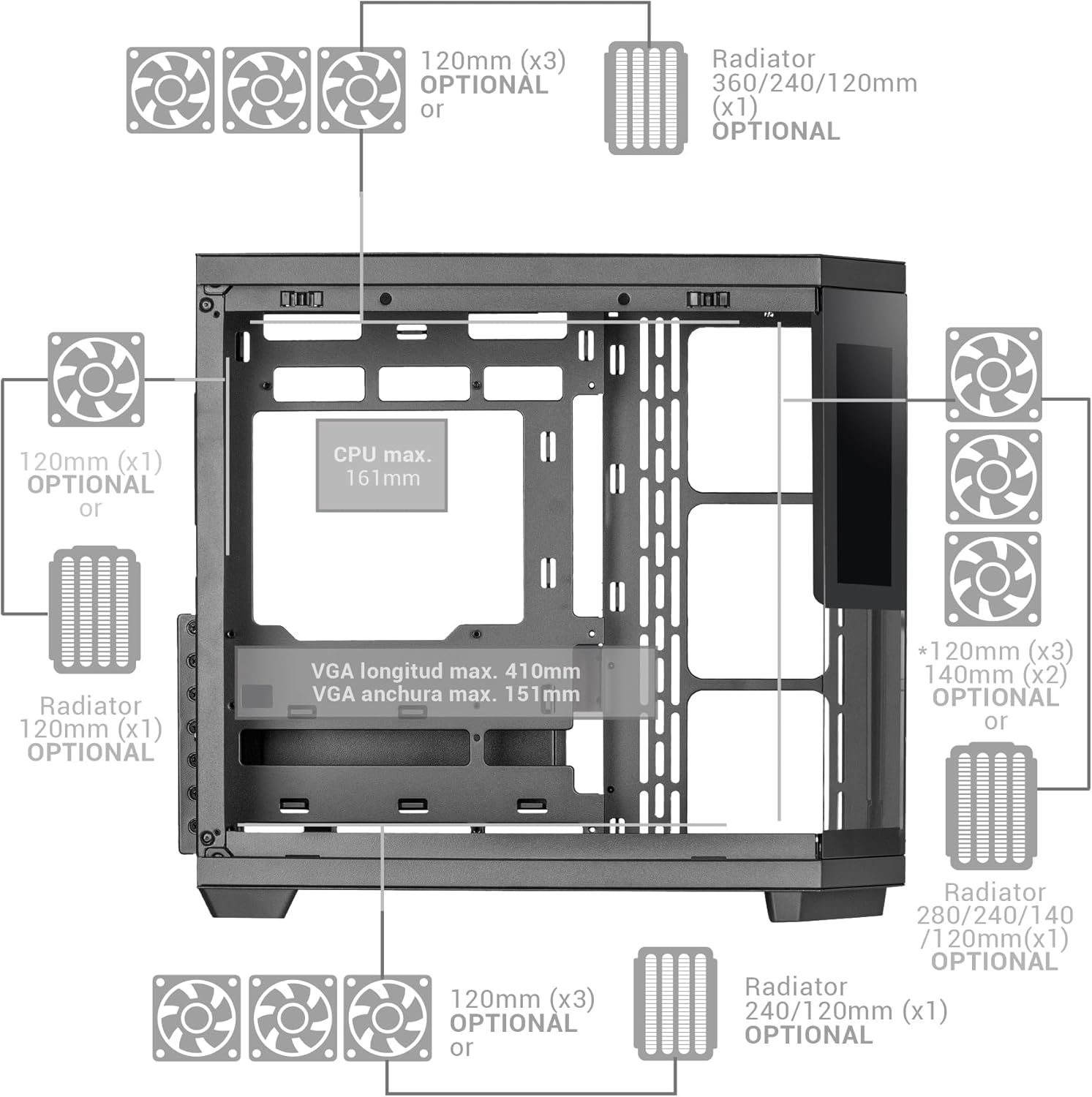
Figure 6: Detailed fan and radiator compatibility diagram.
2.6 Top Panel Connectivity
Connect the front panel headers from your motherboard to the corresponding ports on the case's top panel.
- USB-C porti
- USB 3.0 porti
- USB 2.0 porti
- HD Audio + Microphone Jacks

Figure 7: Top panel connectivity ports.
3. Operating the IPS Screen
The integrated 7.2-inch IPS screen allows for real-time system monitoring and custom visual displays.
- Dasturiy ta'minotni o'rnatish: Install the dedicated control software for the IPS screen (refer to the manufacturer's website for download).
- Ulanish: Ensure the screen is properly connected to your motherboard or graphics card as per the installation guide.
- Moslashtirish: Use the software to display system telemetry (temperatures, usage), custom images, animations, or videos.

Figure 8: Customizable 7.2-inch IPS screen in operation.
4. Xizmat ko'rsatish
Regular maintenance ensures optimal performance and longevity of your PC case.
- Chang filtrlari: The case includes two magnetic dust filters. Regularly remove and clean these filters to prevent dust buildup and maintain efficient airflow.
- Ichki tozalash: With the removable tempered glass panels, the interior is easily accessible for cleaning. Use compressed air to remove dust from components and a soft, dry cloth for surfaces.
- Shisha panellar: Clean tempered glass panels with a microfiber cloth and a glass cleaner suitable for electronics.
5. Muammolarni bartaraf qilish; nosozliklarni TUZATISH
Ushbu bo'lim siz duch kelishi mumkin bo'lgan umumiy muammolarni ko'rib chiqadi.
- Poor Airflow: Ensure all fan positions are utilized effectively and dust filters are clean. Verify that cables are managed to not obstruct airflow.
- IPS Screen Not Displaying: Check all cable connections to the motherboard/graphics card. Ensure the control software is installed and running correctly. Consult the software's troubleshooting guide.
- Komponent mosligi bilan bog'liq muammolar: Refer to the specifications for maximum component dimensions (GPU length, CPU cooler height). Ensure components are correctly seated and secured.
6. Texnik shartlar
| Xususiyat | Tafsilot |
|---|---|
| Brend | Mars Gaming |
| Model nomi | MC3TCORELCD |
| Rang | Qora |
| Ish turi | Markaziy minorasi |
| Material | Temperlangan shisha |
| Anakartning muvofiqligi | ATX, Micro ATX, Mini ITX |
| Ichki haydovchi uyalari | 2x 3.5" HDD / 3x 2.5" SSD |
| Maksimal GPU uzunligi | 410 mm |
| Maksimal GPU kengligi | 151 mm |
| CPU sovutgichining maksimal balandligi | 161 mm |
| Fan sig'imi | Up to 10x 120mm or 7x 120mm + 2x 140mm |
| Suyuq sovutish ta'minoti | Up to 360mm radiators |
| Quvvat manbaini o'rnatish turi | Pastki o'rnatish (ATX) |
| Sovutish usuli | Havo |
| Maxsus xususiyatlar | Dust filter, 7.2" IPS Customizable Screen, Triple Removable Tempered Glass, Dual Chamber Structure |
| Top Panel Connectivity | USB-C, USB 3.0, USB 2.0, HD Audio + Mic |
| Element og'irligi | 6.58 kilogramm |
7. Kafolat haqida ma'lumot
Ushbu mahsulot bilan birga keladi 3 yillik ishlab chiqaruvchi kafolati. Please retain your proof of purchase for warranty claims. For detailed terms and conditions, refer to the official Mars Gaming websayt yoki mijozlarni qo'llab-quvvatlash xizmatiga murojaat qiling.
8. Qo'llab-quvvatlash
For further assistance, technical support, or to download the latest drivers and software for the IPS screen, please visit the official Mars Gaming websayt:
You may also contact Mars Gaming customer service through the contact information provided on their websayt.


